How PromoIQ works
PromoIQ does nothing until you click its icon. This page explains what happens after that, where codes and prices come from, and what PromoIQ will not do.
Five steps
-
Add it to Chrome and pin it
Install PromoIQ from the Chrome Web Store, then pin its icon from Chrome's puzzle menu. There is no account to create. A short first-run page explains the five promises and your two switches.
-
Click the icon on any store
PromoIQ opens a side panel for that tab. You can also press Alt+P, or Option+P on a Mac. It reads the page you are on: the store's name, the product if there is one, any codes printed on the page, and whether there is a promo-code box and an order total. It does not read your other tabs.
-
See codes grouped by proof
Codes appear in groups, from the strongest proof to the weakest. Only the first group means worked.
-
Let it try codes in your cart
On the cart or checkout page, press "Try these codes for me." PromoIQ types one code at a time into the store's code box, reads the total, takes out codes that did not help and keeps the best one. The panel stays open and shows each step.
-
See the same product for less
On a product page, the panel shows up to five offers for the exact same product at other stores, with direct links.
The code groups
- Worked just now in your cart
PromoIQ applied it during this visit and saw your order total go down. Shows how much you saved.
- Worked for PromoIQ shoppers
A shopper who chose to share results saw it lower their total in the last 30 days. Shows when.
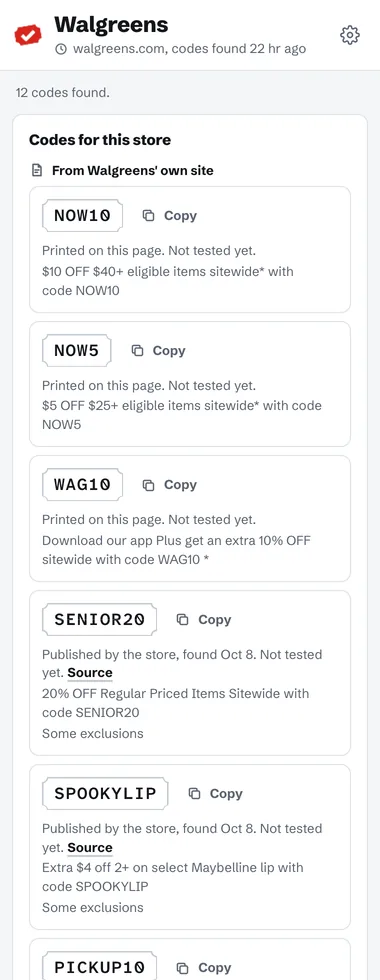
- From the store's own site
Printed on the page you are on, for example in a banner that says "Use code FALL20," or published on the store's own offer pages. Marked not tested yet.
- Found online, untested
Found on another website. PromoIQ shows the site's name and when it found the code. This group stays folded until you open it.
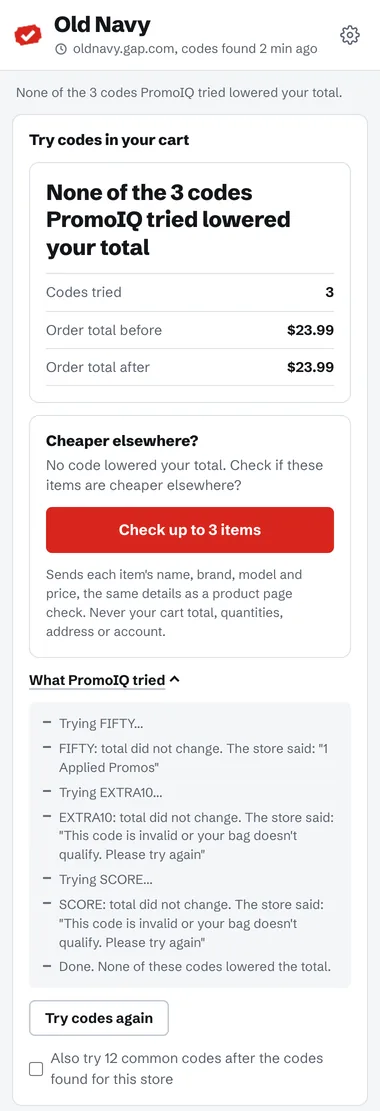
- Tried in your cart
A code PromoIQ tried in your cart that did not lower the total moves here, so you can see it was checked.
- Common codes to try
Codes many stores use, such as WELCOME10. They were not found for this store and are labeled that way. PromoIQ tries them only if you tick the box to include them, and always after the codes found for the store.
Each code has a copy button and, when PromoIQ knows it, the store's own words about it, such as a minimum spend.
Where the codes come from
- Shoppers who share results. If you turn on sharing (it is off by default), PromoIQ reports which codes lowered your total on which store. Others then see "Worked for a PromoIQ shopper" with the date, for up to 30 days. To stop fake reports, this label only appears on codes that the store also publishes or that were found online.
- The page itself. PromoIQ scans the visible text for codes next to words like "code," "promo" or "use," and notes the words around them.
- The store's own site. Every 6 hours, PromoIQ's server reads the public offer pages of about 70 large stores and saves the codes and terms printed there. It follows each site's robots.txt rules, sends one request per page with a name that identifies PromoIQ, and stops if a site blocks it. No shopper data is involved.
- Other websites. PromoIQ's server searches the web for codes for that store and keeps the results for 24 hours. Each one shows the site it came from and when it was found, and stays labeled untested.
Trying codes in your cart
PromoIQ looks for a promo, coupon or discount box with an Apply button next to it, and an order total. Gift card boxes are left alone. For some big stores it has small custom rules where the general method does not work.
If you already entered a code, PromoIQ takes it off to compare fairly, and puts it back if it is still the best.
If the store reloads the page while codes are being tried, PromoIQ asks you to click its icon again to keep going. Chrome lets PromoIQ read a tab only after you click, and PromoIQ never asks for access to any website.
If none of the codes lower your total, PromoIQ says so plainly. When it cannot try codes on a checkout, it tells you why. It stops when the store needs you, for example to sign in or solve a puzzle.
When PromoIQ presses Apply, the store's own page reacts as if you had typed the code yourself, for example with its own code check and analytics. PromoIQ itself sends nothing to the store.
Finding the same product
PromoIQ identifies the product from the data stores publish for search engines (product name, brand, model and barcode numbers such as GTIN, MPN or SKU), and for a few big stores from their item numbers. If it cannot find a real product name or number on the page, it does not run a price check.
Its server then searches Google Shopping for that product through a search provider, keeps only exact matches (the same barcode, or the same brand with the same model number or exact name) and links straight to each store's own product page, never to a search page. Offers are sorted by total price. PromoIQ uses no affiliate links and earns nothing from what you buy.
If nothing matches exactly, PromoIQ says "No exact match found at other stores," and when it knows why, it says that too. It never shows look-alikes as the same product.
What PromoIQ will not do
- Run on a page before you click its icon, or read your other tabs.
- Place an order, or read or change payment, address or account fields.
- Call a code "worked" without seeing a checkout total go down.
- Show a look-alike as the same product.
- Use affiliate links, or add, change or remove a referral on any link.
What it cannot promise
- That any code works for your cart, or that PromoIQ will find a saving.
- That it can try codes on every checkout. Some stores' pages do not allow it.
- That it finds an exact match for every product.
What PromoIQ sends, and when, is listed on the privacy page.